
Key Moments
Connect the LLM to real tools, not just prompts
Treat the LLM as the language layer and use integrations to retrieve specific information and perform specific actions with your permission.Design workflows around what the connection can access and do
A tool’s capabilities (search vs edit, document retrieval vs record updating) determine what the workflow can accomplish—so build around those boundaries.Use connected sources to prepare and verify meeting work
Combine Calendar (context), Gmail (latest correspondence), Drive (proposals/docs), and HubSpot (customer/deal records) to assemble a brief that lists commitments, unresolved questions, and missing evidence.Start small with one repeatable workflow you can measure
Pick a weekly task with a clear output (client brief, invoice review, content research), define the inputs and “done” criteria, compare time saved and quality, then expand connections deliberately.Most business owners are still using large language models for the tasks closest to the chat box: writing a caption, polishing an email or explaining something they do not understand. Those are useful starting points. But once you connect the model to the tools your business actually uses, the opportunity becomes much bigger. You can begin turning LLMs into your business command center.
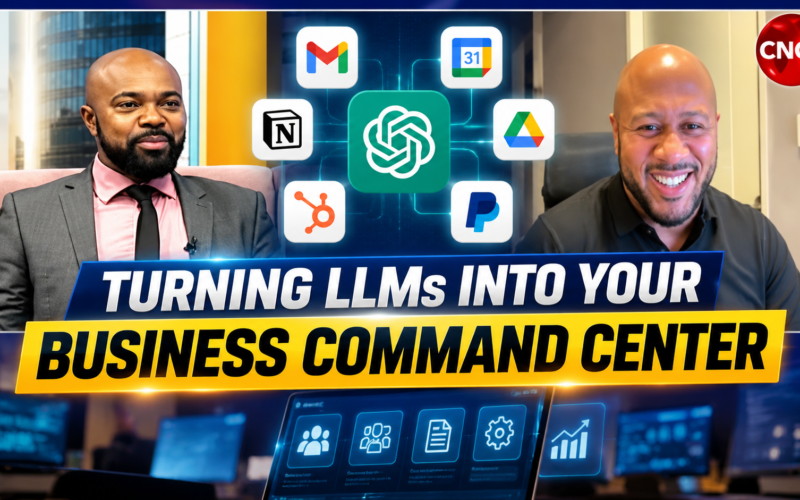
On my Digipreneur Segment on CNC3, I walked through this live with Jason, showing how plugins and connected apps extend what an AI assistant can do. The segment airs every Tuesday at 7:15 a.m. on CNC3. The practical question for an entrepreneur is how these connections can help you work across your business, using the systems and information you already have.
Watch: My Live CNC3 Plugin Walkthrough With Jason
Watch the featured segment below, then explore how the connections in my own working environment translate into everyday business tasks.
What Changes When You Connect an LLM to Your Business?
An LLM is the language and reasoning layer. It can interpret a request, organise information and help work through a problem. A connected tool gives it a defined route into another system: finding an email, retrieving a document, checking a customer record or preparing an invoice. The particular connection determines which actions are available.
That means the model does not suddenly know everything happening inside your company. It needs access to the relevant source, permission to use it and a tool that supports the task. A connection that can search a document library may offer different capabilities from one that can edit documents. As a result, that distinction matters when you start designing real workflows.
People use terms such as plugins, apps, connectors and integrations for these extensions. The labels vary by product. The useful question is simple: what information can this connection retrieve, and what work can it perform with my permission? OpenAI’s official tools documentation describes how tools extend models through capabilities such as search, file retrieval, custom functions and access to external services.
For me, the attraction is having a place to direct work that spans several business systems. I can explain the outcome I want, ask the assistant to gather the relevant information and review what it produces. However, the quality of that result still depends on the information available and the precision of the task.
The Connections in My Business Command Center
My environment includes Gmail, Google Calendar, Google Contacts, Google Drive, HubSpot, PayPal and Ubersuggest, alongside a custom connection for Digipreneur Jobs. Each contributes something different. Together, they create opportunities to move from a general conversation to work grounded in business records. These examples describe the capabilities available through the connections; they are not a claim that every example runs automatically in my business.
Gmail, Calendar and Contacts: Prepare for the Conversation
Gmail gives the assistant a route to search and read relevant correspondence. Calendar provides the meeting context and availability. Contacts helps resolve the right person and their saved details. With a clear request, I can use those sources to prepare for a conversation without manually reconstructing the history from several places.
For example, I might ask: “Find the latest correspondence with this client, identify the outstanding questions and prepare a short brief for our next meeting.” The useful result should tell me what was agreed, what remains unresolved and where that information came from. If the evidence is incomplete, I need that made visible before I walk into the meeting.
Some connected tools also support actions such as creating a calendar event or sending an email. Those are separate decisions. Preparing a reply gives me something to review; sending it creates a communication with another person. My instructions should make the intended outcome clear.
Google Drive: Bring the Working Documents Into the Task
A business stores a great deal of its memory in proposals, reports, spreadsheets and presentations. The Drive connection makes it possible to locate and work with supported files, subject to their permissions and the tools available for that file type. That is valuable when the answer lives in a document rather than in an email.
Imagine preparing a proposal after a client meeting. I can ask the assistant to find the relevant brief, compare it with an earlier proposal and identify what needs to change. For supported document workflows, it can help create or edit the deliverable. I still need to check scope, pricing and commitments before using it with a client.
In other words, the practical gain is continuity. The meeting notes can inform the proposal, and the proposal can inform the follow-up. Clear file names, current versions and sensible access permissions make that work considerably easier.
HubSpot: Put Customer and Sales Records to Work
HubSpot brings structured customer information into the conversation. Its available tools support searching CRM records, retrieving details, working with properties and associations, and creating or updating supported records. That opens the door to much more useful questions than “give me a sales strategy”.
I can ask for a review of open opportunities, a client meeting brief or an examination of records that appear to need attention. A useful brief might combine the relevant deal stage with the latest correspondence and the proposal on file. It should show the evidence behind any suggested next step.
However, the CRM still needs accurate information. If a deal has an outdated close date or an important conversation never made it into the record, the assistant may have an incomplete picture. Connecting the system makes good record keeping more valuable because more work can depend on those records.
PayPal: Connect Invoicing and Payment Information
The PayPal tools in my environment include access to invoice lists, payment links, transaction records and disputes, as well as supported invoice and payment-link creation workflows. That can help bring the payment side of a business into the same working conversation.
For a service business, a practical starting point is reviewing invoice status and preparing a follow-up list. Another is preparing an invoice or payment link from approved details. The amount, currency, customer and description need to be checked before anything is issued. An assistant should also distinguish an invoice that has been sent from money that has actually been received.
This connection does not turn the LLM into a bank or give it unlimited authority over funds. Its usefulness comes from the specific supported tools and the controls around them. Businesses working across currencies should pay particular attention to what each record actually represents.
Ubersuggest: Ground Marketing Decisions in Search Data
Ubersuggest adds a research layer for digital marketing. Its available tools include keyword metrics, domain and competitor research, backlink information and technical site audits. Access to particular reports can depend on the account plan, quotas and selected market.
That changes the conversation I can have about content. Instead of asking an LLM to guess what people search for, I can request relevant research and use it to assess a topic, a competitor or an opportunity. The next step is interpretation: how does that information relate to my audience, my offer and the market I want to reach?
Search volumes and traffic figures are estimates. They need the right location, timeframe and context. A promising keyword is a reason to investigate demand, not a guarantee that an article will rank or bring paying customers. Therefore, my experience and positioning still guide the decision.
How the Connections Can Work Together
The larger opportunity appears when a task crosses systems. Consider preparing for a client meeting. The assistant could use Calendar to identify the appointment, Gmail to find recent discussions, Drive to locate the proposal and HubSpot to retrieve the relevant customer or deal record. It can then assemble a brief with unresolved questions and suggested talking points.
After the meeting, I could provide my notes and ask for a revised proposal and follow-up draft. If I want records updated or a message sent, I need to specify that action. In addition, each stage should produce something I can inspect, and the assistant should report any source it could not access or any step it could not complete.
That is what I mean by a business command center: one working conversation through which I can coordinate supported tasks across connected systems. The underlying applications continue to hold the records and carry out their defined functions. The LLM helps me direct and interpret the work.
A Custom Connection for Digipreneur Jobs
My work with Digipreneur Jobs takes this idea into a system built around a particular business need. The custom connection exposes defined tools for a research queue, task records, findings, reviews and quality holds. That gives the assistant a structured way to work with evidence. Publication remains subject to the engine’s rules and approvals.
The lesson is that a business can define its own operational requirements and build a connection around them. It needs clear records, bounded actions and a way to check outcomes. I explain the broader product and engineering work in how I built the Digipreneur Jobs AI Workforce and Jobs Engine.
Start With One Workflow You Can Measure
For a Caribbean entrepreneur or a small team, I would begin with a recurring task that consumes time and has a clear result. A weekly client brief, a review of outstanding invoices or a content research brief are useful candidates. Choose something you understand well enough to judge the quality of the output.
Map the information required, connect the relevant systems and define what a completed task looks like. Start with a reviewable result. Then compare the time spent and the quality against your usual process. Did it find the right records? Was anything material missing? Did you spend less time assembling information and more time making a useful decision?
A practical instruction could be: “Prepare a brief for my meeting with this client. Use the latest relevant emails, the current proposal and the CRM record. List agreed commitments, outstanding questions and missing information. Include source links. Prepare a follow-up draft for my review.” That gives the assistant a purpose, sources and an output you can assess.
Once that workflow is reliable, expand deliberately. You may connect another source or authorise a specific action. Keep track of where the work saves time, where correction is needed and which tasks still require your expertise. For more context on readiness and oversight, read Should Your Business Start Using AI Agents?
Your Expertise Gives the Command Center Its Direction
My interest in this technology comes from the capacity it creates for a person building a business. A strategist, consultant, creator or service provider can spend a large part of the week finding information, moving it between systems and preparing routine materials. Connected tools can reduce some of that effort and make more substantial workflows possible.
The business owner still brings the judgement: which client matters, what promise is appropriate, whether a source is credible and what the brand should stand for. The better I understand my business, the more precisely I can direct the technology and evaluate its work.
Watch the CNC3 walkthrough above and look at your own working week. Identify one process where connected information would help you make a better decision or complete useful work sooner. That is a practical place to begin turning LLMs into your business command center.
Catch my Digipreneur Segment with Jason every Tuesday at 7:15 a.m. on CNC3 for more conversations about technology, business and the digital economy.